
The difficult part of a configurator is often the second click. The first one is easy to demonstrate: choose a colour, watch the product change, lovely. Then somebody opens the interior, changes the light, clicks another finish during the animation, and tries to go back. That is where the interface either feels dependable or starts asking the person to understand how the application was built.
Across my VariState aircraft, SUV, interiors, and yacht projects, I keep coming back to that ordinary sequence of decisions. A good 3D configurator gives people room to investigate while keeping the current choice understandable. The examples below come from the actual implementations: how options are grouped, where the camera goes, what happens during a change, and how the visitor gets back to a familiar state.
Start by deciding what somebody is allowed to change
The SPACE room planner and SPACE lounge look related, but their jobs are different. In the planner, a visitor can change the room itself and work on the arrangement. In the lounge, the staged furniture gives finish choices a stable reference. Calling both an interior configurator is convenient. Designing both around the same controls would make their actual purpose harder to understand.
I want the first screen to establish that purpose through something concrete. A furnished starting room makes dimensions easier to read because there is already a sofa and table for scale. A useful vehicle overview makes the body finish visible before the visitor learns the camera controls. The initial state is doing explanatory work. It should help somebody make a small decision with the information already in front of them.
This also sets a sensible feature boundary. Adding a furniture catalogue to a fixed lounge would introduce placement, selection, scale, collisions, and lighting questions. It is a different product decision. Before adding another panel, I ask whether it helps the current task or creates a second task that the experience cannot yet support properly. A smaller set of coherent actions gives me something much clearer to build and explain.
Group choices around things people can point to
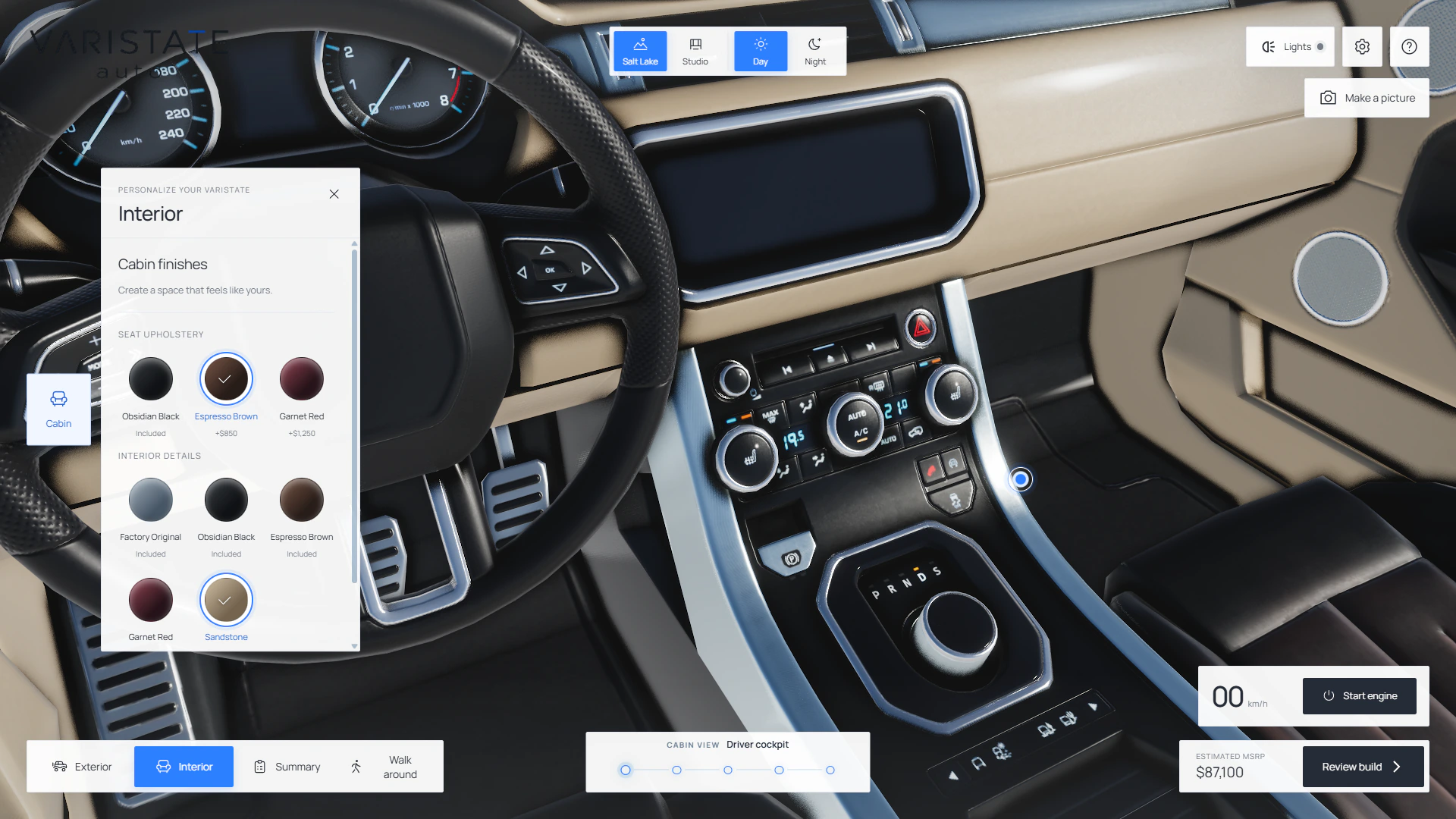
In Marine, hull paint, cockpit upholstery, cabin upholstery, and cabinetry are separate groups. In AUTO, seat upholstery and interior details are separate too. Those names describe visible parts of the product. Internal mesh names and material indices can stay inside the code. A person should be able to connect the label to an area of the object without first learning which texture atlas happens to contain it.
The grouping should also match the actual independence of the choices. Wheel appearance and wheel finish are different controls in AUTO because they influence different parts of the result. A body livery is an authored appearance with graphics and contrasting panels. Presenting it as a plain paint tint would suggest a freedom the asset does not provide. The interface needs to describe the configuration system that really exists underneath it.
I like visible option names even when a swatch already looks obvious. A dark circle can mean black paint, dark upholstery, or a selected state, depending on where it appears. The W3C radio-group pattern describes one selected option within a labelled group and its keyboard interaction. That is a useful reference when designing a mutually exclusive finish choice; the visual treatment still needs a readable label and selection indicator.
Put the relevant surface in front of the person
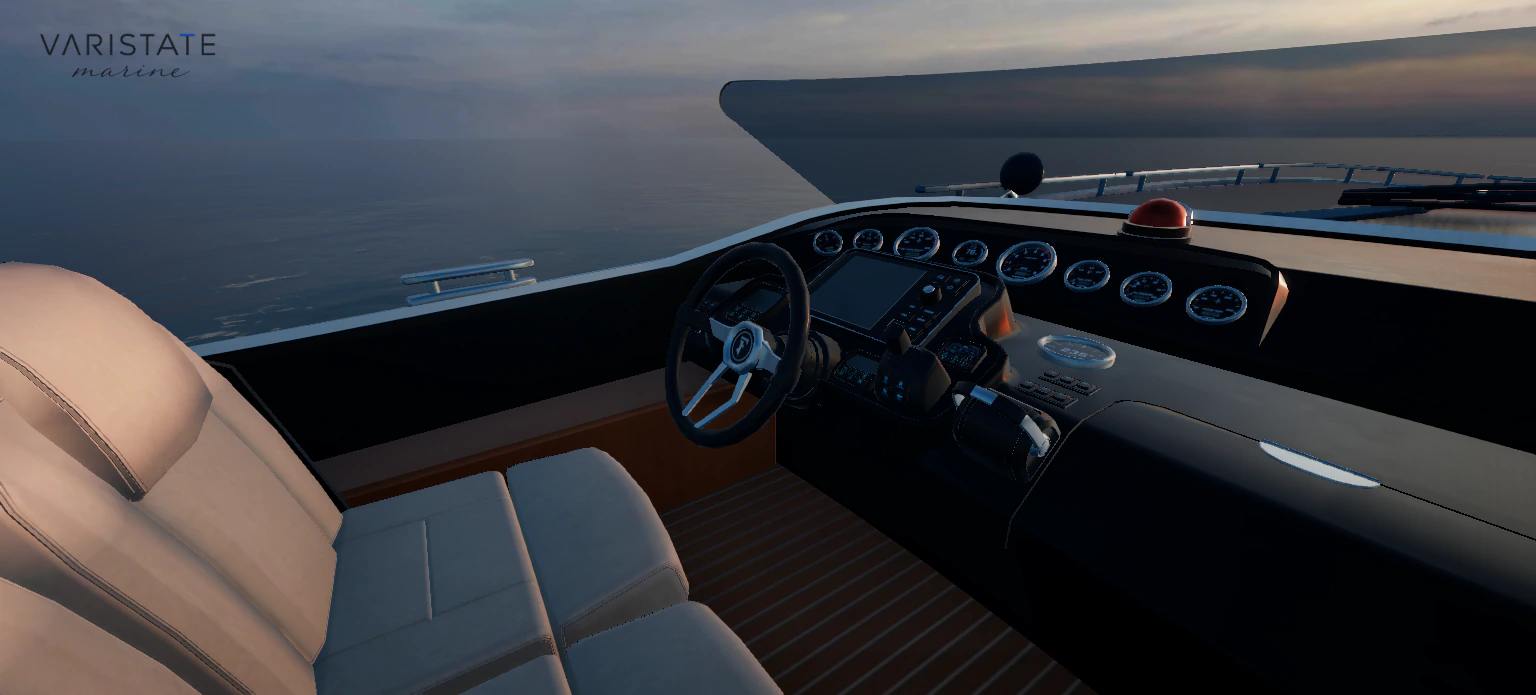
The camera is part of the interface. If someone opens cabinetry choices while the camera is outside a yacht, the controls are asking them to imagine the result. Marine guides the camera toward the relevant interior area instead. Once there, subsequent swatches keep the framing. That gives the camera a clear job: establish a useful comparison, then leave enough stability for the person to judge the options.
This needs a distinction between views and modes. A front view is a convenient composition. Walk mode changes how movement works. Driving gives the controls another meaning again. In AERO, a passenger seat, a cabin walk, and an exterior orbit belong to the same aircraft, but they do not ask the same thing of the camera. Clear names help visitors anticipate which kind of change a button will make.
Transitions need to make spatial sense too. Going into the SUV follows a doorway rather than sending the camera through a pillar. Going below deck follows the yacht companionway. Those routes are useful orientation cues. The person sees how one place connects to another, which makes returning less confusing. The Marine case study goes into the measured routes and the door clearances behind that apparently simple camera move.
A second input during a transition is normal behaviour. Maybe the first destination was wrong, or another view caught the visitor's attention. Starting the next transfer from the current visible pose keeps the change understandable. Restarting from a hidden default pose creates a jump that the person has to mentally repair. I treat interruption as part of the interaction itself, alongside the slower sequence used for a tidy screen recording.
Keep choices when the surroundings change
Configuration and presentation need separate state. A different atmosphere should change the lighting around the selected yacht, while the finishes remain selected. Entering a cabin should preserve the exterior choices waiting outside. Aero carries the configured aircraft between airport and flight scenes. These relationships matter because comparison depends on knowing what stayed constant. If several unrelated settings reset at once, even a beautiful result becomes difficult to interpret.
The AUTO implementation also remembers the outdoor time choice while the visitor tries the studio. That is a small example of respecting the person's previous decision. The studio has its own lighting purpose; returning outside can restore the previous setting. I try to think through those return journeys whenever a feature temporarily moves somebody away from the context in which they were making a choice.
A finish animation should follow the same principle. Several VariState experiences use a spatial sweep to reveal a new material choice. Rapid clicks need to redirect from what is currently visible, with a clear eventual selected state. The animation is feedback, so it needs to remain subordinate to the selection. It would be a strange product control if the visitor had to wait for decorative movement before making up their mind.
Motion preferences belong in that decision. The browser can expose a request to reduce nonessential animation through prefers-reduced-motion. My finish sweeps use an immediate change for that preference. The useful visual information is still there: the selected surface changes and the control reflects the selection. The reveal can be optional without making the underlying choice harder to understand.
A safe way back makes experimenting easier
In the lounge, Original exists within each finish group. That lets someone compare a darker floor and then return that surface to its authored appearance. Marine has a broader restore action for the finishes. The important design detail is the scope. Resetting a surface, resetting all materials, and starting the entire experience again are different actions, and their labels should make that difference clear before somebody presses one.
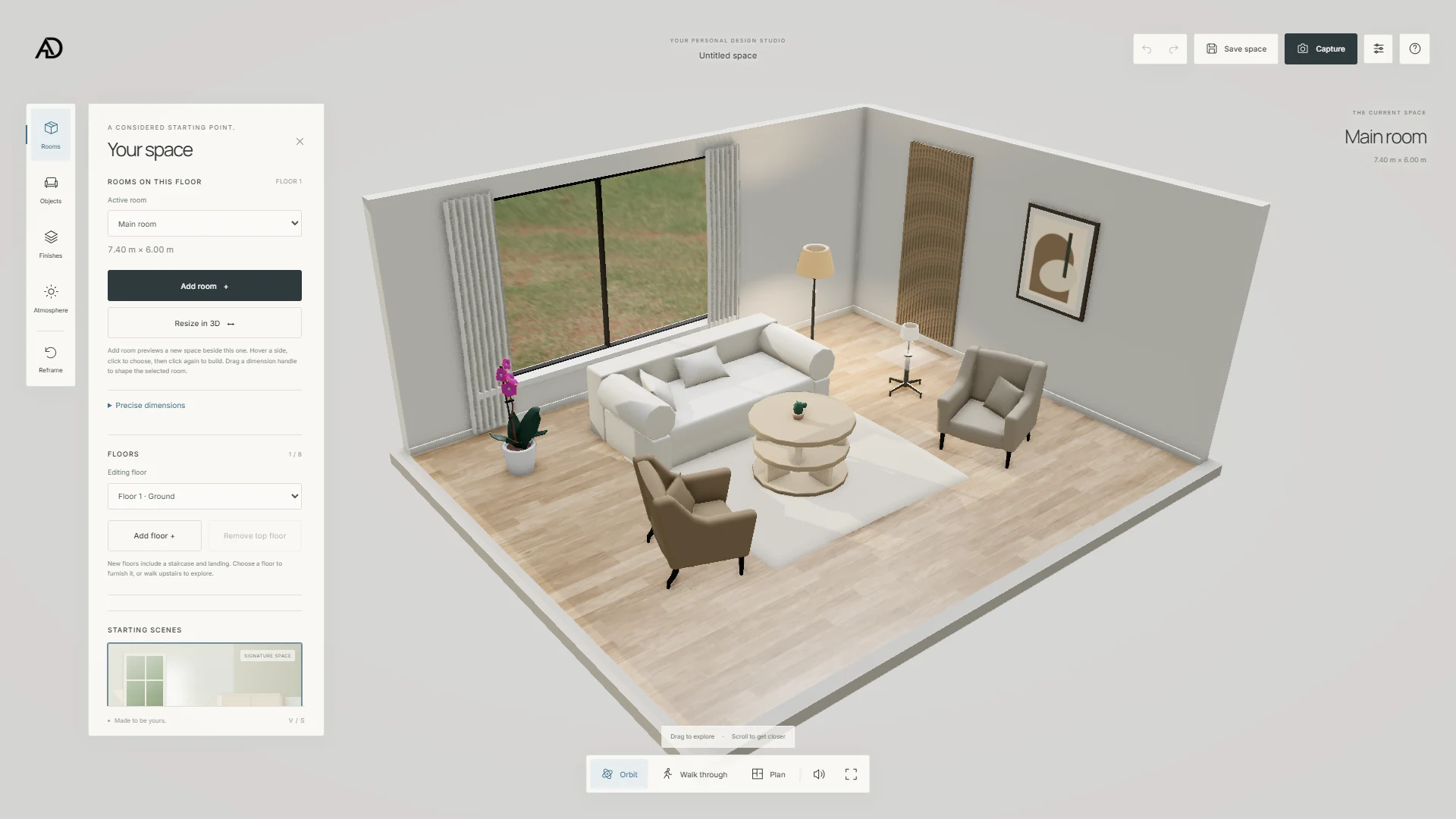
The planner has another kind of reversibility: project history. Moving an opening or changing a room affects more than colour. Undo helps make those edits feel like experiments with a way back. A temporary preview has a related responsibility. Cancelling it should leave the committed room alone. These are ordinary editor behaviours, but they become especially valuable when an unfamiliar 3D handle makes the result harder to predict in advance.
The room-planner article explains the relationship between direct resizing and dimension inputs. I want both because they support different intentions. Dragging is good for exploring a proportion. An input is useful when somebody already knows the measurement. The interface should make the current unit and affected boundary visible, so changing how a number is displayed does not look like changing the physical room.
Input should have one clear owner at a time
A 3D scene and its surrounding controls can compete for the same input. Dragging a room handle should affect that handle while the orbit camera waits. Typing into a field should edit the value while movement waits. Marine pauses keyboard movement when a UI control owns focus, and clicking the scene returns input to the yacht. Those rules stop an innocent interaction with a panel from moving the visitor somewhere unexpected.
Mobile needs the same attention to actual capability. Marine supports touch orbit and detail views, while walking and driving currently use a keyboard. Its finish panels start collapsed on phones. The lounge has a mobile movement pad for its walk mode. Those are different implementations with different boundaries. Making every button smaller would not resolve them; I need to describe and test the actions available on the device in front of me.
Loading is another interaction state. Marine asks for Performance, High, or Ultra before importing the heavy experience. A remembered preference remains a suggestion. That makes the cost of entering more deliberate, especially when someone arrives through a portfolio link on an unfamiliar device. Within the scene, the loading feedback should explain that something is being prepared, while preserving the current choices whenever a secondary environment or asset needs more time.
Review sequences as carefully as screenshots
A screenshot can establish that a panel and a configured surface were visible together. It cannot establish that returning from Walk preserves the camera, or that three quick selections settle on the third finish. I review those as sequences: choose, interrupt, change context, return, reset. Each sequence has a visible expectation. This is a more useful way to inspect interaction quality than checking every control once in isolation.
The lounge is a good small test bed because its arrangement stays fixed. Try a floor, switch to evening, enter Walk, return to orbit, and restore the original floor. That sequence exercises material state, lighting, camera ownership, and reversibility together. The lounge write-up describes the implementation details. The UX question is whether the visitor can still explain what they selected after moving through those different contexts.
For a production project, I would connect this interaction layer to verified option rules, availability, configuration summaries, and the next real business action. Those need their own data and review. My current studies demonstrate the visual and spatial foundation. Keeping that scope clear helps the experience make a useful promise: you can investigate the product, understand what each choice affects, and recover your place while trying something else.
The five VariState projects give me different ways to examine the same problem. The aircraft has long camera journeys, the SUV has independent appearance groups, the planner changes geometry, the lounge holds a room steady, and the yacht adds weather and movement. I keep the controls tied to those specific decisions. When the person can concentrate on the product instead of managing the interface, the complicated implementation is doing its job.